Chess Classic Online: Strategy Board Game
Reviews
Chess Classic Online offers a solid chess experience with a clean interface and responsive controls. The six AI difficulty levels provide good replayability, allowing players to gradually improve. Local multiplayer is a nice addition for playing with friends. The game is ideal for quick matches or extended practice sessions, with no unnecessary distractions.
About This Game
Game Introduction
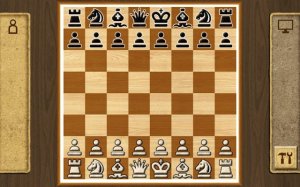
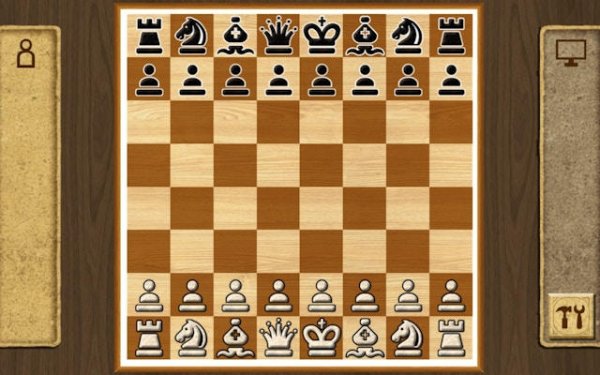
Chess Classic Online is a faithful digital version of the world's most renowned strategy board game. It recreates the classic chess experience with a clean interface and intuitive controls, allowing players to focus entirely on strategy. The game follows traditional international chess rules, where each player commands an army of 16 pieces, including a King, Queen, Rooks, Knights, Bishops, and Pawns. The goal is to achieve checkmate by threatening the opponent's King with no legal move to escape. Designed for both newcomers learning the basics and seasoned players honing their craft, Chess Classic Online offers a pure and challenging intellectual duel. Players can select their preferred mode and difficulty level to set the stage for a battle of wits.
How to Play
To play Chess Classic Online, start by selecting your game mode: single-player against the AI or local multiplayer with a friend. Choose a difficulty level from six options to match your skill. The game begins with your pieces on the board. Take turns moving one piece per turn by clicking on it and then selecting the destination square. Each piece moves according to its unique pattern. The game ends when one player achieves checkmate, or a draw is agreed upon. The interface is user-friendly, with clear visual feedback for valid moves and captures.
Game Features
Chess Classic Online includes an adaptive AI opponent with six difficulty levels for progressive challenges. It offers a local multiplayer mode for head-to-head matches with a friend. Players can customize the game board with different styles. The controls are simple click-to-move, making it easy to play. The game provides strategic depth for practicing tactics and endgames, suitable for short sessions or extended play.
Tips for Success
To improve your game, focus on controlling the center of the board early. Develop your knights and bishops before moving your queen. Castle early to protect your king and activate your rook. Practice regularly against the AI at increasing difficulty levels to sharpen your tactical vision. Study common checkmate patterns and endgame techniques. Review your losses to identify mistakes and learn from them.