
Game Introduction
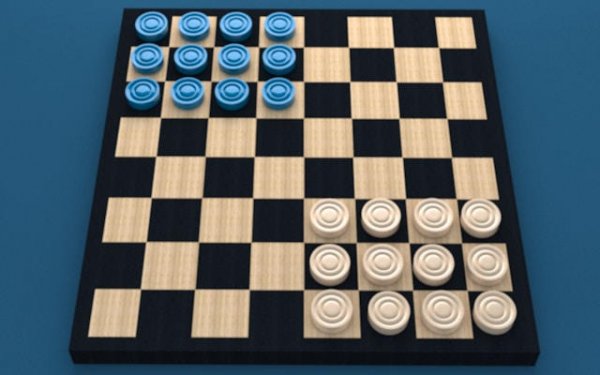
Classic Corners Strategy Board Game Online invites players to a world of thoughtful moves and serene competition. This digital board game transforms traditional strategy into a cozy, atmospheric experience. More than entertainment, it is a mental workout designed to enhance analytical abilities and strategic foresight. Players plan each move carefully, anticipating their opponent's strategy while enjoying a calm, focused environment. Whether you are unwinding after a long day or seeking a cognitive challenge, Classic Corners offers a refreshing escape. The elegant simplicity of the game ensures that every move counts, making it a rewarding experience for puzzle enthusiasts and strategy lovers alike.
How to Play
The goal is to outmaneuver your opponent by strategically moving your pieces across the board. On your turn, select a piece and move it to an adjacent empty corner. Plan your moves to block your opponent and create paths for your own pieces. The game ends when one player cannot make a legal move. The player with the most pieces on the board wins. You can play against a computer opponent with adjustable difficulty levels, from Beginner to Master, or challenge a friend in local multiplayer mode on the same device.
Game Features
Adaptive AI that adjusts to your skill level. Local multiplayer mode for playing with friends on the same device. Calm atmosphere with soothing visuals and sounds. Strategic depth that encourages careful planning and foresight. Adjustable difficulty levels from Beginner to Master.
Tips for Success
To excel in Classic Corners, focus on controlling the center of the board early to limit your opponent's options. Always think a few moves ahead, anticipating possible responses. Practice regularly against different difficulty levels to sharpen your strategic thinking. Learn to recognize common patterns and traps. Stay patient and calm—rushed moves often lead to mistakes. Finally, analyze your losses to understand what went wrong and improve.







Comments
0 comments