
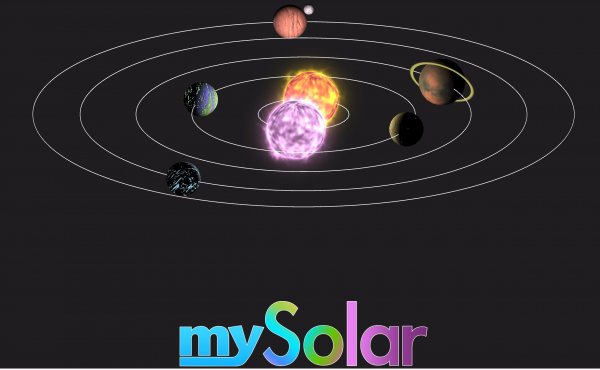
Core Concept & Creative Freedom
Star Forge: Orbital Creator places you in command of a vast, empty region of space. Your primary goal is to transform this void into a thriving solar system by placing planets and arranging their paths. Unlike many simulation games that focus on pre-set scenarios, this title emphasizes pure creativity. You decide the size, order, and spacing of each world. The game does not impose a strict narrative, allowing you to experiment with different configurations. This open-ended approach encourages repeated playthroughs as you test various orbital layouts.
Resource Gathering & Navigation
To construct new planets, you must first collect the necessary materials scattered across the galaxy. Using standard mouse and keyboard controls, you pilot your vessel through different sectors. Each area contains unique resource nodes that yield points used as currency. Efficient navigation is important because some regions are more dense with materials than others. You may also encounter floating space debris that requires careful maneuvering. The resource system rewards patience and exploration, as richer deposits are often located in harder-to-reach zones.
Orbit Purchase & Expansion Strategy
Once you have gathered enough points, you can purchase orbits that serve as placeholders for new planets. Each orbit has a different radius and orientation, affecting how your solar system looks and functions. Strategic planning comes into play because orbits cost varying amounts. Prioritizing larger orbits early can allow for more planets later, but smaller orbits are cheaper and let you start building sooner. The game does not have a fixed end point, so you can continue expanding indefinitely. This gradual growth gives a satisfying sense of progression.
Mini-Games & Bonus Challenges
Scattered throughout the universe are optional mini-games that offer extra rewards. These short challenges typically involve timing or precision tasks, such as guiding your ship through a moving asteroid field. Completing them successfully grants bonus points that accelerate your system-building efforts. The mini-games are not required to progress, but they add variety to the main loop of exploration and construction. They also provide a welcome break from the slower pace of resource collection.
Visual Style & Platform Availability
The game features a clean, colorful art style that makes celestial bodies easy to distinguish. Planets have distinct colors and textures, and the background starfield changes as you move between sectors. Star Forge: Orbital Creator is available on web browsers and mobile devices, with fullscreen support for an immersive view. The interface is designed to be intuitive, with clear icons for navigation, inventory, and construction. This accessibility makes it suitable for casual players while still offering depth for those who enjoy optimization.
Tips for Efficient System Design
To make the most of your time, focus on exploring one sector thoroughly before moving to the next. This minimizes travel and maximizes resource yield. Purchase orbits in a balanced way: a mix of small and large orbits creates a visually interesting system and allows for steady expansion. Engage with mini-games as they appear, as the bonus points can significantly shorten the time needed to afford expensive orbits. Finally, take breaks to review your system from different angles. Sometimes a fresh perspective reveals a better arrangement.













Comments
0 comments