
Character Selection & Style
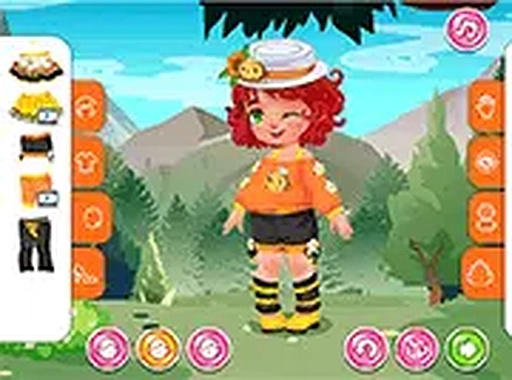
Players begin by picking one of three adorable toddies to dress. Each character has a unique base appearance, offering a fresh canvas for every session. The selection process is quick, letting children jump straight into the creative part without delay. This focus on choice encourages repeated play as kids explore how different outfits look on each toddie.
Outfit Assembly & Color Play
The wardrobe includes a range of bee-inspired pieces such as striped tops, soft wings, and playful headbands. Users can pick individual items and then adjust their colors to match or contrast. This layer of customization goes beyond simple dressing—it teaches basic color theory and personal taste. Mixing unexpected shades leads to surprising and delightful results.
Accessories & Finishing Touches
Beyond clothing, the game offers small decorative items like flower clips, honey pots, and tiny crowns. These extras let players add personality to each outfit. The ability to layer accessories means no two creations look exactly alike. Children learn to balance elements, deciding when a look feels complete or needs one more detail.
Saving & Sharing Creations
A built-in screenshot tool captures the final design with a single tap. Players can save these images to their device or share them with family and friends on social profiles. This feature turns the game into a social activity, where kids can show off their work and get positive feedback. It also provides a way to track progress over time.
Cross-Platform Accessibility
Buzz & Bloom Styling Studio works directly in web browsers on both phones and computers. There are no app store downloads, no account sign-ups, and no hidden costs. This low barrier to entry means any child with an internet connection can start playing instantly. The full-screen mode on desktop offers a larger view for detailed work.




Comments
0 comments